Under 6,000 Sq Ft: Crestron vs Control4 for Luxury Homes and Resale
Compare Crestron and Control4 for luxury homes under 6,000 sq ft. See when custom programming, dealer choice, and cost affect resale, timelines, and budget.
Under 6,000 Sq Ft: Crestron vs Control4 for Luxury Homes and Resale
Choose Crestron for large estates, multi-structure properties, or homes with custom automation logic that off-the-shelf configuration can’t handle. Choose Control4 for luxury homes under roughly 5,000 to 6,000 square feet where faster deployment and lower entry cost matter more than bespoke programming. The real decision hinges on two things: how much custom behavior you actually need, and how much time and budget you have for programming labor. Bring both to your first integrator meeting.
TL;DR:
- Crestron excels in large, multi-structure estates requiring complex, bespoke automation logic, and it supports very large system scalability with advanced programming.
- Control4 offers faster deployment and lower costs for homes under approximately 5,000 square feet, with a standardized interface that simplifies daily use and maintenance.
- The key decision factor is how much custom behavior the home needs; extensive, multi-condition logic points toward Crestron, while straightforward setups suit Control4 better.
- Builder and dealer support plays a crucial role, as Crestron programmers are rarer and typically more expensive, affecting project timelines and ongoing maintenance.
- Hardware costs for Crestron are higher, but total installed costs often balance out with labor and peripheral equipment, especially in large or complex homes.
Table of Contents
- Crestron vs Control4: A Side-by-Side Comparison
- What Can Each Platform Actually Be Programmed to Do?
- How Big Does Your Home Need to Be for Crestron?
- What Does Each System Actually Cost to Install?
- What’s the Daily Experience Like for Homeowners and Guests?
- Finding and Vetting a Qualified Dealer
- Building a Decision Checklist Before You Meet an Integrator
- How Smart-Home Systems Affect Luxury Listings and Buyer Impressions
- Selected Resources for Further Research
- Why This Comparison Misses the Point Most Buyers Actually Care About
- Sources
- FAQ
Crestron vs Control4: A Side-by-Side Comparison
Both platforms handle lighting, climate, security, and entertainment control competently. They differ primarily in the level of customization, scalability, and availability of qualified installers.
| Dimension | Crestron | Control4 |
|---|---|---|
| Best for | Estates, multi-structure properties, bespoke automation logic | Luxury homes under ~5,000–6,000 sq ft, faster timelines |
| Customization | Deep, via SIMPL/SIMPL+ programming and custom drivers | Visual configuration through Composer HE, less granular |
| Scalability | Validated for very large systems; processor headroom expanded with recent OS updates | Solid for mid-size homes; scales less aggressively at the high end |
| Cost shape | Higher hardware cost, higher programming labor | Lower hardware cost, lower labor hours |
| Ease of deployment | Longer commissioning, more programming time | Faster install, more standardized process |
| Typical integrations | Broad, often via custom drivers and modules | Wide native support for music, locks, and lighting |
| Dealer availability | Elite programmers are rarer, command premium rates | More dealers in most markets, easier to source |
The single biggest pivot in this comparison isn’t price. It’s how much custom behavior your home actually needs. If your project calls for cross-device logic that off-the-shelf visual configuration can’t express, that pushes you toward Crestron regardless of budget. If your automation needs are straightforward, layering Crestron’s programming depth onto a project that doesn’t need it just adds cost and timeline risk.
Three quick takeaways before you go deeper:
- Crestron’s advantage shows up most in scale and bespoke logic, not everyday reliability. Both platforms are dependable when installed correctly.
- Control4’s standardized interface reduces training friction for households and guests, which matters more than people expect once family members start using the system daily.
- Dealer availability is a real constraint, not a footnote. Fewer certified Crestron programmers means longer lead times in some markets.
What Can Each Platform Actually Be Programmed to Do?
Crestron’s architecture is built around SIMPL and SIMPL+, a graphical and text-based programming environment that lets integrators write custom logic from scratch. Nothing about how a Crestron system behaves is fixed by the manufacturer. If you can describe the behavior, a skilled programmer can usually build it. That’s the trade-off: more capability, but also more dependency on whoever wrote the code.
Crestron Home, the manufacturer’s more standardized consumer platform, trims that flexibility in exchange for faster deployment and a friendlier configuration process. It’s a meaningful middle ground, and recent updates have made it even more useful. Crestron’s own SIMPL Integration Modules let integrators blend the polished Crestron Home interface with underlying SIMPL logic in the same project. That means a homeowner can get a clean, simple app experience on the surface while a programmer handles genuinely complex behavior behind the scenes. It’s the best of both approaches, when a dealer knows how to use it.
Control4 takes a different path entirely. Its Composer HE environment is visual and configuration-driven rather than code-driven. Integrators drag, drop, and connect devices and triggers using pre-built logic blocks. It’s faster to learn, faster to deploy, and far less likely to produce a fragile custom build that only one programmer understands. The ceiling is lower, but for the vast majority of residential automation needs, that ceiling is high enough.
Here are four behaviors that typically require Crestron-level programming rather than visual configuration:
- Time-of-use logic across seasons: shading, lighting, and HVAC that shift behavior based on sunrise/sunset calculations layered with occupancy patterns, not just fixed schedules.
- Wine cellar and HVAC interlocks: humidity and temperature systems that must coordinate with mechanical systems elsewhere in the house, with fail-safes if one system reports an error.
- Multi-condition triggers across dozens of devices: a single scene that checks the state of ten or more devices before deciding what to do, common in large estates with layered security and AV zones.
- Custom driver behavior for non-standard equipment: pool automation, specialty lighting fixtures, or estate-grade irrigation systems that don’t have a native Control4 driver.
Pro Tip: Ask any integrator to show you an actual SIMPL program from a past project, not just a finished app screen. The interface tells you nothing about maintainability. The code underneath does.
The maintenance question matters more than most buyers realize going in. A Control4 project built in Composer HE is generally maintainable by any certified Control4 dealer, because the configuration follows a standardized structure. A custom Crestron SIMPL program is only as maintainable as the documentation the original programmer left behind. If that person leaves the business or the dealership closes, whoever inherits the project has to reverse-engineer the logic before they can safely change anything. That’s not a reason to avoid Crestron. It’s a reason to ask about documentation and code ownership before you sign a contract.
How Big Does Your Home Need to Be for Crestron?
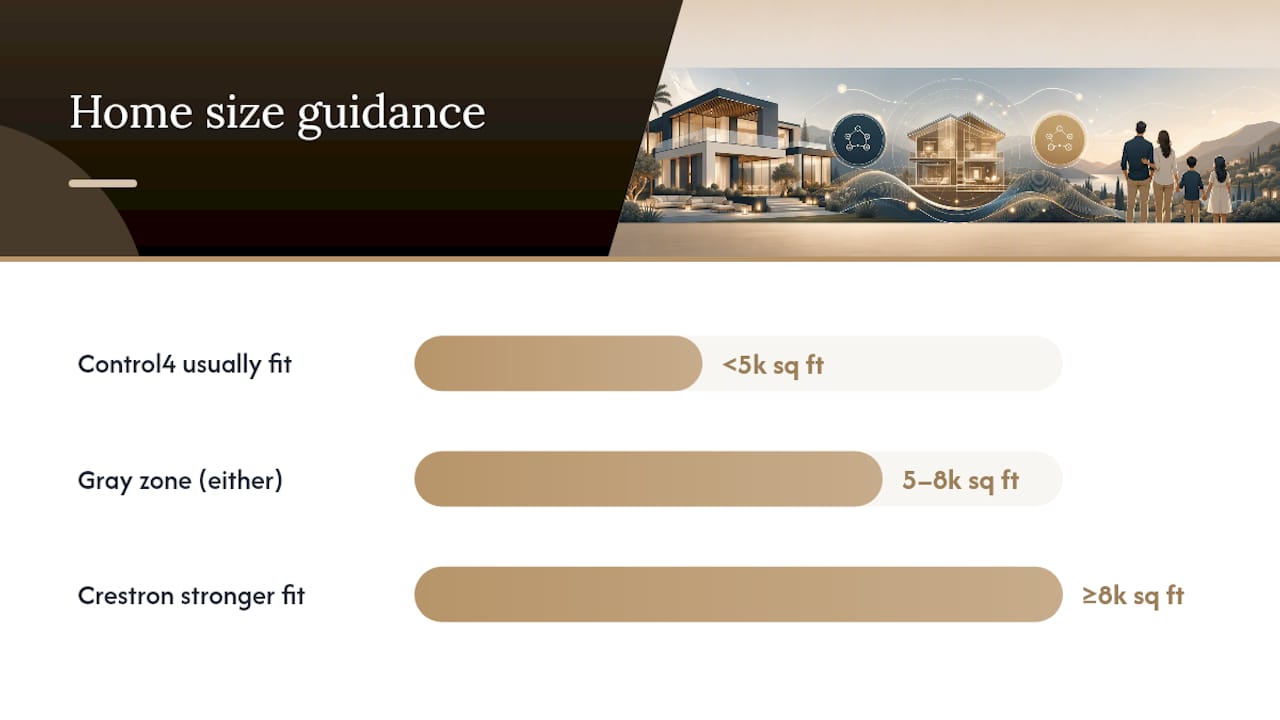
Home size and zone count are the clearest practical filters for choosing between these platforms. Crestron’s commercial lineage, the same processors and design philosophy used in office buildings and hotels, shows up directly in how far its systems scale. Crestron Home OS 4.10 increased validated maximum system sizes across supported processors, giving dealers more room to design ambitious projects without hitting a hardware ceiling mid-build.
Here’s rough sizing guidance based on how integrators typically approach projects:
- Under roughly 5,000 square feet: Control4 is usually the more efficient choice. Deployment is faster, the interface is standardized, and you’re unlikely to need programming depth that Composer HE can’t provide.
- Roughly 5,000 to 8,000 square feet: this is the genuine gray zone. Either platform can work, and the decision usually comes down to how many custom behaviors the homeowner wants versus how quickly they need the project finished.
- 8,000 square feet and above, or multi-structure estates (main house plus guest house, pool house, or barn): Crestron typically becomes the stronger fit. Zone counts climb fast. The validated headroom built into recent processors matters when you’re running lighting, climate, AV, and security across multiple buildings from a unified system.
Phased construction changes this calculus somewhat. If you’re building in stages, over a multi-year renovation, a phased addition, or a compound built out over several seasons, both platforms support incremental growth, but they handle it differently. Control4 projects tend to be added in modular chunks, room by room, with each addition following the same configuration pattern as the last. Crestron projects scale more like enterprise IT systems: the initial processor and network design either has headroom built in or it doesn’t, and retrofitting that headroom later is expensive. If you know your project will expand within the next decade, say so at the design phase, not after the first structure is finished.
What Does Each System Actually Cost to Install?
Total installed cost breaks into four buckets: control hardware, wiring and labor, AV and peripheral equipment (speakers, amplifiers, cameras, sensors), and programming labor. Homeowners often fixate on the first bucket and miss that it’s usually not the biggest one.
Installer analyses consistently find that Crestron hardware runs 30 to 50 percent more at the rack level compared to equivalent Control4 hardware. That sounds like a decisive number until you look at where the rest of the budget goes.
The real cost driver isn’t the processor. In most luxury projects, labor and AV/peripheral equipment, speakers, amplifiers, wiring, cameras, and sensors, account for a larger share of total installed cost than the control platform itself. Programming labor closes most of the remaining gap. Once you add those categories in, total installed-cost differences between the two platforms often narrow considerably.
Practical items to negotiate before you sign a contract:
- Commissioning acceptance criteria: what specific tests confirm the system works before final payment is due.
- Change order pricing: what happens (and what it costs) if you want to add a zone or device after the design is locked.
- Programming labor rate and estimated hours: get this itemized separately from hardware, especially on Crestron projects.
- AV equipment allowances: speakers and amplifiers vary wildly in price, and vague allowances are where budgets blow out.
Ask your integrator to break the quote into these four buckets explicitly. A dealer who can’t or won’t itemize labor separately from hardware is a dealer whose pricing you can’t actually compare against a competing bid.
What’s the Daily Experience Like for Homeowners and Guests?
Both platforms integrate with the usual suspects: streaming music services, Lutron lighting, Sonos audio, security cameras, and voice assistants. How they get there differs, and it affects both setup time and long-term reliability.
- Control4 natively supports a wide range of music services and third-party devices out of the box, which means less custom driver work and fewer things that can break with a firmware update.
- Crestron can integrate the same services and devices, but often through custom drivers or programmed integrations rather than baked-in native support, which adds development time upfront but doesn’t limit what’s ultimately possible.
- Crestron Home OS pairs with purpose-built touchscreens and a modern app interface, giving homeowners a polished, branded experience once the backend integrations are complete.
- Control4’s standardized interface means every room and every installation looks and behaves consistently, which matters when grandparents or house guests need to operate the system without a tutorial.
Remote management and cloud services affect upkeep on both platforms. Firmware updates, remote diagnostics, and cloud backup of configurations reduce how often a technician needs to physically visit the property, which matters for owners who split time between multiple homes or travel frequently. Ask specifically how each platform handles remote troubleshooting before you commit, because the answer varies by dealer, not just by manufacturer.
Finding and Vetting a Qualified Dealer
Dealer quality matters more than platform choice in the vast majority of failed smart-home projects. Both Crestron and Control4 certify installers, but the tiers and rarity differ. Community discussion among installers and enthusiasts, including threads comparing the two platforms directly, consistently notes that Control4 dealers are easier to find in most markets, while elite-level Crestron programmers are scarcer and command premium rates for their time.
Before signing with anyone, get these three items in writing:
- Firmware update policy: who applies updates, how often, and whether it’s included in an ongoing service fee or billed separately.
- Remote support terms: response time commitments for issues that can be diagnosed without an on-site visit.
- Service level agreement: on-site response time for issues that can’t be fixed remotely, especially for security and climate-critical systems.
Pro Tip: Ask to see a documented programming portfolio, not just a highlight reel of finished installations. Vetting guides consistently recommend requesting actual programming examples and long-term support commitments as the decisive step, because a polished demo tells you nothing about what happens two years from now when something breaks.
Red flags worth walking away from: a dealer with no visible project portfolio, evasive or vague answers about how firmware updates get handled, and pricing quotes that lump hardware, labor, and AV equipment into one number with no itemization. Any of those three should end the conversation before you sign anything.
Building a Decision Checklist Before You Meet an Integrator
Walk into any integrator meeting with five numbers already decided: square footage, the specific custom behaviors you actually want (not just “smart home”), your timeline, your budget ceiling, and whether resale value matters to you within the next five to ten years.
Ten questions worth asking, and what a credible answer sounds like:
- “What’s the largest system you’ve deployed on this platform?” A specific project size and zone count, not a vague “many large homes.”
- “Can you show me a documented programming example?” Actual code or configuration screenshots, not just a finished app demo.
- “How do firmware updates get applied, and what’s included?” A specific policy, not “we handle it.”
- “What happens if I want to add a room in three years?” A clear answer about processor headroom and cost to expand.
- “How is programming labor priced separately from hardware?” An itemized breakdown, not a bundled number.
- “Who owns the source code or configuration file?” This matters enormously if you ever change dealers.
- “What’s your response time for a system failure?” A specific SLA in hours, not “as soon as we can.”
- “How does this integrate with my existing Lutron or Sonos gear?” A specific answer about native support versus custom driver work.
- “What’s your commissioning acceptance process?” A defined test checklist before final payment.
- “Can I speak with a past client from a similarly sized project?” A yes, ideally with contact information offered unprompted.
For commissioning sign-off, insist on a written test of every zone, every scene, and every failure-mode scenario (power loss, network drop, device offline) before releasing final payment. A dealer who resists a documented commissioning checklist is telling you something about how confident they are in their own work.
How Smart-Home Systems Affect Luxury Listings and Buyer Impressions
Working across pre-construction and remodel projects in Austin, we’ve seen how integrated systems shape a buyer’s first impression of a luxury property. A well-documented, professionally maintained system reads as a genuine asset during a showing. A poorly documented or half-finished one reads as a liability the next owner will have to solve, and buyers notice the difference within minutes of walking through.
The platform choice itself matters less to resale than whether the system is documented, maintainable, and matched to the home’s actual architecture. A Crestron system with no code documentation is worse for resale than a well-configured Control4 system, regardless of which platform cost more to install. If you’re planning a pre-construction or remodel project, aligning technology decisions with your architect and designer early avoids the retrofit costs that come from wiring decisions made too late in the build. Privacy and security integrations, camera placement, and access control also factor into how buyers perceive a home’s privacy features during a showing.
If you’re buying or selling a home with an existing automation system, or planning one for new construction, bring your real estate advisor into the conversation at the same time as your integrator. Coordinating both early prevents decisions made in isolation from working against each other later, whether that’s wiring choices that limit future flexibility or a system too bespoke for the next buyer to maintain without the original programmer.
If you’re evaluating properties with integrated systems already in place, or planning a build where technology and architecture need to move together from day one, browse our current luxury listings or ask about our private off-market opportunities where pre-construction technology planning is often still on the table.
Selected Resources for Further Research
Crestron’s own product pages and OS 4.10 update notes are the most reliable source for validated system sizing. For real-world cost breakdowns, the Restrepo Innovations comparison offers the most detailed installer-level cost analysis available. For broader smart-home context, see current trends in sustainable and connected home tech.
Why This Comparison Misses the Point Most Buyers Actually Care About
Most coverage of Crestron versus Control4 treats this as a specs battle, hardware capability against hardware capability. That framing misses what actually determines whether a homeowner is happy two years later: documentation, dealer continuity, and whether the system matches what the house actually needs.
The conventional advice tells buyers to pick the platform with the most features. I’d argue the better question is who’s going to maintain this system when the original installer isn’t available anymore. A modest Control4 install with a dealer who documents everything beats an ambitious Crestron build with a programmer who’s the only person who understands it. Scale your platform choice to your actual home, not to what sounds most impressive at a dinner party. For most luxury homes under 6,000 square feet, that means Control4 deserves a serious look even if Crestron’s brand carries more weight in conversation. Prioritize the dealer relationship first. The platform comes second.
— Mike
Sources
- Crestron Home OS feature spotlight — Crestron
- Crestron vs. Control4 for a Luxury New Build: An Honest Comparison | Restrepo Innovations
- Control4 vs Crestron: Which Smart Home System Wins? | DigLiv
FAQ
What Can I Replace Control4 With?
Crestron is the most common alternative for buyers who need deeper custom programming or plan to scale into a larger, multi-structure property; for most homes under 6,000 square feet, though, Control4 remains a strong fit on its own.
How Much Does a Control4 System Cost?
Total cost depends heavily on home size, zone count, and AV equipment, but Control4 hardware typically runs lower than equivalent Crestron hardware, and labor gaps between the two platforms narrow once wiring and AV gear are factored into the full quote.
Is Control4 Still Relevant?
Yes. Control4’s standardized interface and native support for a wide range of music services and third-party devices make it a practical, well-supported choice for luxury homes that don’t need bespoke programming logic.
Which Country Is Crestron a Brand From?
Crestron is an American company, headquartered in Rockleigh, New Jersey, with roots in commercial and enterprise control systems before expanding into residential automation.